
Everyday requests to a cheap model.Demanding ones to a big one.
You pay 20% of the savings actually achieved. If no savings arise, no savings fee is charged. Savings sends every request first to the cheapest model that can handle it, and shows the saving in euros, request by request.
10-day pilot for free, you keep all the savings.
Your data trains only your own savings model.
A small query pays a big model’s price.
Once a big model is chosen for an application, it does everything: summarising customer feedback, classifying a support ticket, formatting an email. Most of a company’s AI queries are exactly this kind of everyday work, and they don’t need the largest model.
The bill grows every month, and nobody knows where the money goes or which application sent it.
Without routing, every row costs the price of the large model. Savings makes the same split for you, request by request.
Cheapest sufficient model first.
Savings sends every request first to the cheapest model that can handle it. If the answer fails the quality gate, the request moves up to a bigger model. Enter your own AI bill and see what routing does to it.
You save €0/mo, or €0 a year.
i
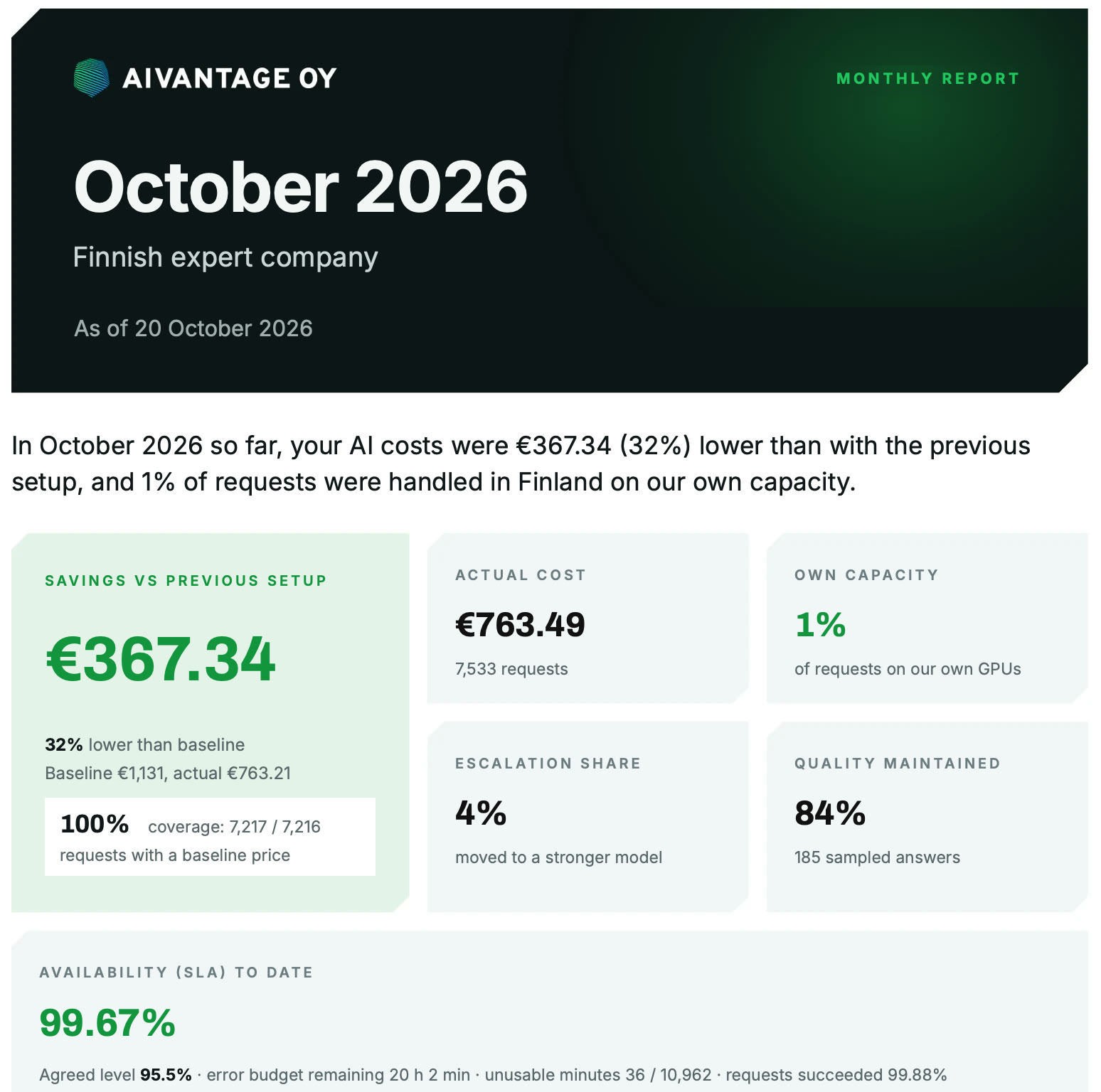
This is how savings show up in the report.
Our own production use in October 2026. After the pilot you get the same report for your own traffic.
- €367, or 32% lower costs than the reference price
- 7,533 requests, of which 4% the quality gate moved up to a stronger model
- Quality held in 84% of 185 sampled responses
- 99.67% uptime, against an agreed level of 95.5%
Every request at two prices.
- 01
The reference price
The reference price is preset to the public list price per million tokens of the most expensive model you allow, and you can change it in the portal. Every request is compared against it.
- 02
Savings, request by request
The saving is the difference between the reference price and the actual price for exactly the same requests. You see both figures for every request, and which application sent it.
- 03
Check the math yourself
The request log can be downloaded as a CSV file, so every figure can be checked with your own calculation.
A cheap answer is accepted only if it’s good.
The quality gate
A cheaper model’s answer is returned only if it passes the quality gate. Otherwise the request moves up to a bigger model.
Spot checks
A sample of requests also runs on the strongest model your rules allow, and the answers are compared side by side. The result appears in the pilot report.
Locked model
For a task where you want no compromises, you can lock the model. The request then always goes to the model you chose. On locked-model requests you pay 20% only of what AIvantage’s cache saved.
Savings are on from the first request.
- 01
Add your key.
You add your OpenAI, Anthropic, Google or xAI key to your own portal. The bill keeps coming straight from the model provider.
- 02
Change the address.
You change one address and key in your application and set the model to
auto. Savings are on from the first request. - 03
See the savings.
The portal shows the saving in euros, and the price of every request side by side with the reference price.
Savings in questions
See current prices here.
The reference price is the public list price per million tokens of the most expensive model you allow. It is preset for you, so getting started requires nothing, and you can change it in the portal. The saving is the difference between the reference price and the actual price for exactly the same requests. The request log shows both prices for every request, and you can download the log as a CSV file and calculate it yourself. If a period ends up negative, the report shows it as it is, and no savings fee is charged.
A cheaper model’s answer is returned only if it passes the quality gate. Otherwise the request moves up to a bigger model. On top of that, a sample of requests also runs on the strongest model your rules allow, and the answers are compared side by side. The result appears in the pilot report. For a task where you want no compromises, you can lock the model. Then no savings arise, and none are billed either.
You don’t have to trust blindly. Create a separate key for AIvantage in your model provider’s console. You can see in the provider’s own view what it is used for, and revoke it there in seconds. AIvantage stores the key encrypted (AES-256-GCM) and never shows it to anyone after it is saved. From prompts and responses we store only training excerpts for your own savings model. They are deleted after 180 days, and collection can be switched off.
Savings apply to traffic through the API, meaning applications, integrations and coding assistants that use an API key. AIvantage does not connect to per-user licences such as ChatGPT or Copilot subscriptions. If there is no API traffic, there is nothing to save, and no invoice either.
In an OpenAI- or Anthropic-compatible application, including Claude Code, getting started begins with changing the address and key. Automatic routing additionally requires the model to be set to auto or aivantage/auto. The embeddings API, Batch and Files API are not supported. We check the features your application needs at the start of the pilot.
If the model provider doesn’t respond, the request moves to the next model your rules allow. If AIvantage itself doesn’t respond, your application gets an error. You then put the model provider’s own address and key back in the application, and traffic flows directly again. In our own production use in October, uptime was 99.67%, against an agreed level of 95.5%.
A little. Shield adds under a millisecond to a typical request. Name detection takes more, about 65 ms per thousand new characters, when names are blocked. When the quality gate rejects a cheaper model’s answer, the query goes to a bigger model, and that request takes longer. In the pilot, latency is measured on your own traffic.
From the invoices. The report shows in euros the usage of every use case and key. If the model provider’s own invoice is larger than the usage that passed through AIvantage, the difference tells you that someone is using AI outside your policy.
You get a summary with the savings in euros and percent, Shield’s findings and the result of the quality spot checks. Then you decide whether to continue. If you continue, Savings costs 20% of the savings actually achieved. If you don’t activate the service, the API stops when the pilot ends, and nothing is billed for the pilot. You get a summary of the pilot savings by email.
Only your own savings model. Your data trains only your own savings model – never shared models, other customers or our own purposes. Training excerpts are deleted after 180 days, collection can be switched off, and data is deleted on request.
You switch the application’s address and key back to the model provider’s own. Then you remove your key from the portal and revoke the AIvantage keys. It’s worth downloading the logs and reports as CSV files before you leave.
Three switches, one API.
Savings, Shield and Sovereignty are switches on the same API. You turn on the ones you need and pay only for those that are on.
A smaller AI bill.
Everyday requests go to a cheap model, demanding ones to a large one. You pay 20% of the savings that actually happen.
You are hereSensitive data never leaves in identifiable form.
Detection, masking, logging and blocking before the request leaves. €29/mo per API key.
Read moreOpen models on our own capacity in Finland.
The requests you choose never leave the country. No need to buy your own hardware.
Read more
The savings of the first 10 days are all yours.
Get started10-day pilot for free, you keep all the savings.
Your data trains only your own savings model.